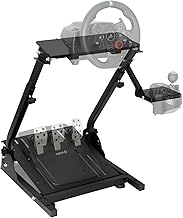
So, you've got your hands on the legendary Logitech G920 racing wheel, a cornerstone for countless entry-level and intermediate sim racers. Its force feedback, durable build, and compatibility make it a fantastic choice. But to truly unlock its potential and achieve that immersive, stable driving feel, you need a proper foundation. That's where a dedicated racing wheel stand comes in. This guide will walk you through everything you need to know about pairing your G920 with a stand, focusing on setup, ergonomics, and getting the most from your gear.
Why Your Logitech G920 Needs a Proper Stand
Mounting your Logitech G920 to a desk is a common start, but it comes with limitations: shaky feedback, limited adjustability, and a less-than-ideal driving position. A dedicated stand transforms your experience. It provides a rigid platform that absorbs the wheel's force feedback without wobbling, bringing out the detail in every curb rumble and tire slip. More importantly, it allows for precise ergonomic adjustment. Being able to set the wheel height, angle, and pedal position to match your body is crucial for comfort during long stints and for consistent, precise control.
Choosing the Right Racing Wheel Stand for Your G920
Not all stands are created equal. When shopping for a stand compatible with your Logitech G920, look for these key features, exemplified by stands like our Height Adjustable & Foldable Steering Wheel Stand:
- Universal Compatibility: Ensure it has the specific mounting pattern for Logitech wheels. The G920/G29 use a standard three-hole pattern.
- Adjustability: A height adjustable stand is non-negotiable. Look for stands that allow you to change the wheel deck height and tilt to find your perfect driving posture.
- Stability & Rigidity: The stand must have a wide, weighted base or solid construction to handle the G920's force feedback without tipping or flexing.
- Pedal Mounting: A secure, non-slip pedal plate is essential to prevent the G920's pedals from sliding under heavy braking.
- Foldability & Storage: For those with limited space, a foldable cockpit design is a game-changer, allowing you to stow your entire setup away when not in use.
Step-by-Step: Mounting Your Logitech G920 to a Wheel Stand
1. Unboxing and Initial Assembly
Lay out all parts of your racing wheel stand. Typically, you'll have the main frame, wheel deck plate, pedal plate, and various bolts and tools. Follow the manufacturer's instructions to assemble the base frame. For a foldable stand, ensure the locking mechanisms are engaged and tight before proceeding.
2. Attaching the Logitech G920 Wheel Base
Place the wheel base onto the stand's mounting plate, aligning the three holes on the bottom of the G920 with the holes on the plate. Use the provided bolts (usually M6) and washers. Hand-tighten them initially in a star pattern to ensure even pressure, then use the included Allen key or wrench to secure them firmly. Avoid over-tightening, which could strip the threads. A solid mount is critical to prevent any movement or creaking during intense force feedback events.
3. Securing the G920 Pedals
Position the G920 pedal set on the stand's pedal plate. Most plates have rubberized surfaces or ridges to grip the pedals. For extra security, especially if you use a stiff brake mod, use the provided straps or brackets to bolt the pedal plate directly to the stand. This eliminates any chance of the pedals sliding forward when you stomp on the brake.
4. Cable Management
Route the power cable and the pedal-to-wheel cable neatly along the stand's frame. Use zip ties or Velcro straps (often included) to bundle cables and prevent them from tangling with your feet or chair. A clean setup is a safe and professional-looking setup.
Optimizing Your Ergonomics and Driving Position
Now for the most important part: dialing in your position. This is where an adjustable steering wheel stand shines.
- Wheel Height & Angle: Adjust the wheel deck so the center of the wheel is roughly level with your shoulders or chest when your arms are slightly bent. Your hands should fall naturally onto the 9 and 3 o'clock positions. Tilt the wheel slightly towards you for a comfortable grip.
- Pedal Distance: Slide the pedal plate forward or back so you can fully press the brake pedal with your leg still slightly bent at the knee. You should not have to fully straighten your leg.
- Seating Position: Use a stable office chair or gaming chair. Consider using a strap or anti-roll wheels to keep the chair from rolling back when you brake. The goal is to have your body, wheel, and pedals feel like a single, connected unit.
Fine-Tuning Your Logitech G920 Settings for a Stand
With the solid foundation of a stand, you can now refine your in-game force feedback (FFB) settings. Because the stand reduces dampening and flex, you may find you can lower the overall FFB strength slightly while increasing the detail. Experiment with settings like:
- Overall Strength: Start at 75-80% in-game and adjust based on feel.
- Damper & Spring: These can often be reduced compared to a desk mount, as the stand itself provides natural stability.
- Rotation Angle: Set to 900 degrees for most cars, but adjust per vehicle for realism (e.g., 360-540 for Formula cars).
The rigid connection allows you to feel more of the road texture and tire behavior, making you a faster, more consistent driver.
Maintenance and Care for Your Setup
To ensure longevity of both your Logitech G920 and your gaming wheel stand, periodically check the tightness of all bolts, especially after the first few hours of use as things settle. Wipe down the stand and wheel with a dry cloth. If you have a foldable model, follow the instructions carefully when folding and unfolding to avoid pinching cables or straining hinges.
Conclusion: Elevate Your Sim Racing Game
Pairing your Logitech G920 with a quality, adjustable racing wheel stand is one of the most impactful upgrades you can make. It moves you from a casual setup to a dedicated, professional-feeling rig. The improvement in stability, consistency, and comfort is immediate and profound. By following this guide to properly mount, adjust, and tune your gear, you're not just setting up hardware—you're building the foundation for faster lap times and more immersive racing experiences. Ready to take the next step? Explore our recommended racing wheel stand solutions designed specifically for Logitech wheels like the G920 and G29.


