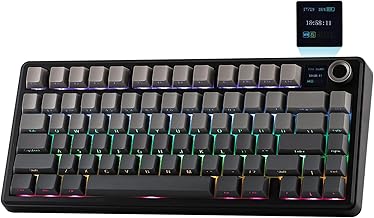
In the bustling world of mechanical keyboards, finding the perfect balance of features, sound, and value can be a challenge. Enter the Aula F75, a wireless mechanical keyboard that promises a premium experience without the premium price tag. This 75% layout keyboard has garnered significant attention for its unique "creamy" acoustic profile, versatile connectivity, and user-friendly hot-swappable design. Whether you're a gamer seeking responsiveness, a typist craving comfort, or an enthusiast looking for a solid foundation to customize, the Aula F75 presents a compelling case. This comprehensive review will dissect its design, performance, and overall value to help you decide if it's the right keystroke for your needs.
Unboxing and First Impressions: The Aula F75 Build Quality
Right out of the box, the Aula F75 makes a strong impression. It boasts a solid, weighty construction that feels far from cheap. The case has a subtle texture, and the keycaps exhibit a clean, modern aesthetic. Our unit featured the advertised "creamy" colorway, which is both stylish and versatile for any desk setup. The inclusion of a high-quality braided USB-C cable, a 2.4GHz wireless dongle, and a keycap puller in the box is a welcome touch, showcasing Aula's commitment to providing a complete out-of-the-box experience. The overall fit and finish suggest careful attention to detail, belying its budget-friendly positioning.
Design & Layout: The 75% Form Factor Advantage
The 75% keyboard layout is a sweet spot for many users, and the Aula F75 executes it well. It retains the crucial function row and navigation cluster (like Home, End, PgUp, PgDn) while eliminating the numpad, saving substantial desk space. This makes the F75 an excellent choice for gamers who need more mouse real estate or professionals working on compact desks. The keys are well-spaced, and the slightly elevated profile provides a comfortable typing angle. The design is minimalist yet functional, with the branding kept discreet.
RGB Lighting and Customization
As a dedicated RGB gaming keyboard, the Aula F75 doesn't disappoint. The per-key RGB backlighting is vibrant and even, with excellent shine-through on the keycap legends. It offers a plethora of lighting effects—wave, ripple, reactive typing, and more—all controllable without dedicated software. Using a simple key combination, you can cycle through modes, adjust brightness, and change colors. While it lacks the granular software control of some premium brands, the onboard options are more than sufficient for most users to create an immersive gaming atmosphere.
The Heart of the Board: Reaper Switches and Creamy Sound
The defining characteristic of the Aula F75 is its signature sound profile. Pre-lubricated linear "Reaper" switches are installed by default, which are central to achieving that smooth, deep, and notably "creamy" auditory experience. The keystrokes are consistent and surprisingly quiet for linear switches, with a satisfying thocky bottom-out sound that has become highly sought after in the keyboard community. This pre-lubed state out of the factory is a huge advantage, as it delivers a premium typing feel that often requires manual modification on other boards. It truly lives up to its name as a creamy sound keyboard.
Versatile Connectivity: Bluetooth, 2.4GHz, and Wired
Connectivity is where the Aula F75 shines as a modern wireless mechanical keyboard. It features a reliable tri-mode connection: Bluetooth 5.0 for pairing with up to three devices (perfect for switching between a PC, laptop, and tablet), a low-latency 2.4GHz wireless mode via the included USB dongle for gaming, and a reliable USB-C wired connection. Switching between modes is seamless with a dedicated switch on the side of the keyboard. The battery life is impressive, lasting weeks on a single charge with moderate use and RGB at medium brightness, making it a truly cable-free option for daily use.
The Enthusiast's Dream: Hot-Swappable PCB
Perhaps one of its most future-proof features is the hot-swappable keyboard design. The Aula F75 uses a 5-pin hot-swappable socket, which means you can easily pull out the stock Reaper switches and replace them with virtually any other MX-style mechanical switch without any soldering. This opens up a world of customization. Want a tactile bump? Pop in some Boba U4Ts. Prefer a clicky switch? The board is ready for them. This feature transforms the F75 from a simple peripheral into a long-term platform for your personal preference, greatly enhancing its value over time.
Typing and Gaming Performance
In daily use, the Aula F75 excels. The pre-lubed linear switches offer a buttery smooth keystroke with minimal wobble, making for a pleasant and fatigue-free typing experience for long sessions. For gaming, the combination of the responsive linear switches and the stable 2.4GHz wireless connection provides a lag-free experience. We tested it in fast-paced FPS and MOBA titles, and there was no perceptible input delay. The compact 75% layout also allows for quicker hand movements between the keyboard and mouse. The stabilizers on the larger keys (spacebar, enter, shift) are well-tuned from the factory, with little to no rattle, contributing to the overall solid and premium feel.
Software and Programmability
It's important to note that the Aula F75 operates primarily via onboard controls. While this simplifies setup and avoids driver issues, it does mean advanced macro programming and complex lighting syncing typically require dedicated software, which Aula does not provide for this model. However, for most users, the onboard controls for lighting and basic functions are perfectly adequate. The focus here is on hardware quality and immediate usability.
Who Is the Aula F75 Wireless Keyboard For?
The Aula F75 is an incredibly versatile board that suits several user profiles:
- Budget-Conscious Enthusiasts: It offers premium features like hot-swap sockets and a great typing feel at an entry-level price.
- Gamers Needing Desk Space: The 75% layout is ideal, and the 2.4GHz wireless mode is reliable for competitive play.
- Office Workers & Students: The creamy sound is not overly loud, and the multi-device Bluetooth is perfect for a clean, multi-device workflow.
- Beginners to Custom Keyboards: The hot-swappable design is the perfect, risk-free gateway into the world of switch customization.
Final Verdict: Is the Aula F75 Worth It?
After extensive testing, the Aula F75 Wireless Mechanical Keyboard stands out as a remarkable product in its price segment. It successfully delivers on its core promises: a delightful creamy sound, robust wireless performance, and a highly customizable foundation thanks to its hot-swappable design. While it may lack some high-end frills like dedicated software or an aluminum case, what it offers for the price is exceptional. It provides about 90% of the experience of keyboards costing twice as much. If you're looking for a feature-packed, great-sounding, and versatile wireless mechanical keyboard that won't break the bank, the Aula F75 is undoubtedly a top contender and comes highly recommended.