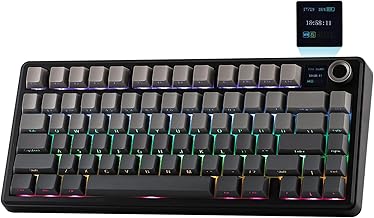
In the ever-evolving world of mechanical keyboards, the 75% layout has carved out a significant niche, offering a perfect balance between compactness and functionality. Among the contenders in this space, the Aula F75 Pro emerges as a compelling option, promising a blend of premium features at an accessible price point. This comprehensive guide delves into every aspect of the F75 Pro, from its build quality and typing experience to its extensive customization options, helping you determine if this is the ultimate compact keyboard for your needs.
Unboxing and First Impressions: The Aula F75 Pro Build
Right out of the box, the Aula F75 Pro makes a strong impression. Its construction feels solid, thanks to a combination of materials that lend it a premium heft without being overly heavy. The keyboard utilizes a gasket-mounted design, which is a sought-after feature in the custom keyboard community for its ability to provide a softer, more cushioned typing feel and reduce case ping. The side-printed PBT keycaps are a standout feature; not only are they durable and resistant to shine, but the subtle side-printing maintains a clean aesthetic while providing secondary function legends.
The 75% Layout: Maximizing Space and Efficiency
The 75% form factor is arguably one of the most practical layouts available. It retains the crucial function row, navigation cluster (Insert, Delete, etc.), and arrow keys that are often sacrificed in smaller 60% or 65% keyboards, all while saving considerable desk space compared to a full-sized board. For users transitioning from a larger keyboard or those who rely on these keys for work or gaming, the 75 percent mechanical keyboard layout of the F75 Pro offers the best of both worlds. The inclusion of a dedicated volume knob is a masterstroke, adding both convenience and a tactile element of control that is often missing from compact boards.
Typing Experience: Switches, Sound, and Feel
At the heart of any mechanical keyboard is its switch, and the Aula F75 Pro comes equipped with factory pre-lubed Reaper switches. Pre-lubrication is a significant value-add, as it eliminates the tedious, time-consuming process of hand-lubing switches to achieve a smoother, less scratchy keystroke and a more pleasant sound signature. Out of the box, these switches provide a consistent and satisfying typing experience. The gasket mount design further enhances this by allowing a slight flex, absorbing shock and contributing to a deeper, more muted acoustic profile compared to stiff tray-mounted designs.
The Hot-Swap Advantage: Endless Customization
Perhaps the most future-proof feature of the F75 Pro is its hot swappable keyboard PCB. This 5-pin hot-swap socket design means you are not married to the included Reaper switches. Whether you prefer the tactile bump of a Brown switch, the linear smoothness of Reds, or the clicky feedback of Blues, you can easily swap them in without any soldering required. This opens the door to a vast ecosystem of third-party switches, allowing you to tailor the sound and feel of your Aula F75 to your exact preferences over time, a core tenet of the custom keyboard hobby.
Connectivity and Performance: A Truly Wireless Workhorse
The Aula F75 Pro shines as a versatile wireless gaming keyboard. It offers triple-mode connectivity: a stable 2.4GHz wireless dongle for lag-free gaming, Bluetooth 5.0 for connecting to multiple devices like laptops, tablets, or phones, and a reliable USB-C wired connection for charging and absolute latency elimination. This makes it an excellent choice for a clean, cable-free desk setup or for users who frequently switch between a gaming PC and a productivity machine. The battery life is robust, ensuring you won't be constantly searching for the charging cable.
Lighting and Aesthetics: RGB Done Right
For enthusiasts who love a personalized setup, the RGB mechanical keyboard features of the F75 Pro are impressive. The per-key RGB backlighting is bright and vibrant, capable of creating stunning lighting effects. The software, if available, typically allows for deep customization of these effects, macros, and key remapping. The side-printed PBT keycaps allow the RGB light to shine through the main legends while the side printing remains subtle, creating a sophisticated look that isn't overly gamery.
Who Is the Aula F75 Pro For?
The Aula F75 Pro is an ideal keyboard for a wide range of users. It's perfect for the budding keyboard enthusiast who wants to dip their toes into the world of customization without a soldering iron. Gamers will appreciate the wireless freedom, responsive pre-lubed switches, and compact form factor that frees up mouse space. Professionals and typists will love the efficient 75% layout, excellent stock typing feel, and the ability to work wirelessly across devices. It successfully bridges the gap between a ready-to-use gaming peripheral and a customizable enthusiast board.
Potential Considerations
While the F75 Pro offers tremendous value, it's important to note a few points. The included keycap set, while high-quality PBT, may not satisfy users seeking specific aesthetic profiles like SA or Cherry. The sound, though good out of the box, can be further refined with aftermarket modifications like tape mods or switch films, which is part of the fun for custom keyboard lovers. As with any wireless device, ensuring the 2.4GHz dongle has a clear path to the keyboard is key for optimal performance in competitive gaming scenarios.
Final Verdict: Is the Aula F75 Pro Worth It?
In conclusion, the Aula F75 Pro Wireless Mechanical Keyboard stands out as a remarkably complete package in the competitive 75% market. It checks nearly every box a modern user could want: a premium gasket-mount build, versatile wireless connectivity, a fantastic stock typing experience with pre-lubed switches, and the invaluable freedom of a hot-swappable PCB for future upgrades. Whether you're seeking a high-performance, clutter-free wireless gaming keyboard or a customizable typing instrument that won't break the bank, the F75 Pro makes a compelling argument. It demonstrates that you don't need to spend a fortune to get a taste of the premium custom keyboard experience, making it an easy recommendation for anyone looking to upgrade their input device.