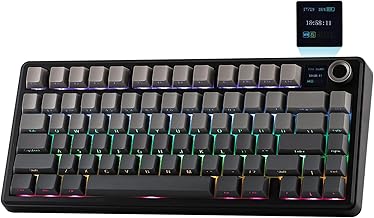
In the crowded market of budget mechanical keyboards, the Aula F75 has emerged as a compelling contender. Promising a premium typing experience without the premium price tag, it aims to bridge the gap for gamers and typists who want quality on a budget. But does it live up to the hype? In this comprehensive review, we'll dive deep into every aspect of the Aula F75, from its construction and switches to its software and everyday performance, to help you decide if it's the right keyboard for your setup.
Unboxing and First Impressions
Right out of the box, the Aula F75 makes a surprisingly solid impression. The packaging is straightforward, containing the keyboard itself, a detachable USB-C cable, a keycap puller, and a user manual. The keyboard's weight is immediately noticeable; it feels substantial and well-built, lacking the hollow, plasticky feel common in its price range. The design is clean and minimalist, with a standard 75% layout that saves desk space while retaining essential function keys and arrow keys. Our review unit featured a sleek black case with white backlighting, offering a professional aesthetic suitable for both office and gaming environments.
Build Quality and Design
Durability is a key concern with budget peripherals, and the Aula F75 largely excels here. The chassis is made from a thick, high-quality ABS plastic that shows minimal flex under pressure. The keycaps are double-shot PBT, a significant upgrade over the cheaper ABS keycaps found on many competitors. Double-shot PBT means the legends won't wear off over time, and the material provides a pleasant, slightly textured feel. The keyboard features a two-stage adjustable kickstand, allowing for a more ergonomic typing angle. While it lacks the heft of an all-metal construction, the build quality of the Aula F75 punches well above its weight class, offering a sense of durability that inspires confidence.
Switch Options and Typing Experience
The heart of any mechanical keyboard is its switches. The Aula F75 is typically available with Outemu switches, with Blue, Red, and Brown variants being the most common. We tested the model with Outemu Brown switches, which offer a tactile bump without the audible click of Blue switches, making them a versatile choice for both typing and gaming.
- Tactile Feedback: The Outemu Browns provide a pronounced tactile bump that is satisfying for accurate typing. It's not as sharp as a Cherry MX Brown, but it's very effective for its price.
- Actuation Force & Sound: With an actuation force around 55g, they are light enough for prolonged gaming sessions yet provide enough resistance to prevent accidental key presses. The sound profile is a soft thock, not overly loud for office use.
- Stabilizers: The larger keys (spacebar, enter, shift) are stabilized. While they are not the highest-grade lubed stabilizers, they are surprisingly good for the price, with minimal rattle and a consistent feel.
Overall, the typing experience is crisp, responsive, and enjoyable. It's a massive upgrade over any membrane keyboard and competes favorably with keyboards costing twice as much.
Features and Customization
For a budget-focused board, the Aula F75 is packed with features. The most prominent is the per-key RGB backlighting, which is vibrant and customizable. While it may not have the software depth of a Corsair or Razer, it offers multiple static and dynamic lighting modes controlled directly through keyboard shortcuts.
A notable feature is the hot-swappable socket design. This is a game-changer in the budget segment. It means you can easily pull out the Outemu switches and replace them with any other compatible 3-pin mechanical switches without any soldering. This future-proofs the keyboard, allowing enthusiasts to upgrade the feel and sound over time. The inclusion of this feature alone makes the Aula F75 an incredible value proposition for those looking to dip their toes into keyboard customization.
Other features include full N-key rollover (NKRO) for flawless simultaneous key presses in games, a detachable USB-C cable for easy transport and replacement, and Windows/Mac compatibility.
Performance for Gaming and Daily Use
Gaming Performance
In fast-paced FPS and MOBA titles, the Aula F75 performs admirably. The low latency and NKRO ensure that every key press is registered instantly and accurately, which is crucial for competitive gaming. The linear Red switch variant would be the ideal choice for pure gamers seeking the fastest actuation, but the Brown switches we tested offered a great balance, providing enough tactile feedback for precise ability casting without being distracting.
Typing and Productivity
For long writing sessions or coding marathons, the keyboard is comfortable and efficient. The 75% layout takes some getting used to if you're coming from a full-size board, but the dedicated arrow keys and a compact cluster of Home, End, PgUp, and PgDn keys (accessed via the Fn key) cover most productivity needs. The PBT keycaps feel great, and the overall typing rhythm is consistent and satisfying.
Pros and Cons Summary
After extensive testing, here is our balanced assessment:
Pros:
- Exceptional Value: Unbeatable feature set for the price.
- Solid Build: Dense, flex-free chassis and high-quality PBT keycaps.
- Hot-Swappable Sockets: A rare and highly valuable feature at this price point, offering great customization potential.
- Good Typing Feel: Reliable Outemu switches provide a satisfying mechanical experience.
- Clean Aesthetic: Sleek design that fits any desk setup.
Cons:
- Basic Software: Lacks the deep macro and lighting customization of premium brands.
- Stabilizers Could Be Better: While decent, the spacebar and other large keys can exhibit slight rattle.
- Non-Detachable Cable on Some Models: Be sure to check the specific model listing, as some versions may have a fixed cable.
Who Is the Aula F75 For?
The Aula F75 is an ideal keyboard for several types of users:
- Budget-Conscious Gamers: If you want a reliable, responsive mechanical keyboard for gaming without spending a fortune, this is a top-tier choice.
- First-Time Mechanical Keyboard Buyers: Its low entry cost and hot-swappable feature make it a perfect, low-risk introduction to the world of mechanical keyboards.
- Students and Remote Workers: The solid build, good typing feel, and relatively quiet Brown/Red switches make it excellent for dorms, libraries, or shared home offices.
- Custom Keyboard Beginners: The hot-swap sockets invite experimentation with different switches, making it a fantastic and affordable platform for learning about customization.
Final Verdict
The Aula F75 is a standout product that redefines expectations for budget mechanical keyboards. It doesn't just match competitors in its price range; it surpasses many of them by offering premium features like hot-swappable sockets and PBT keycaps. While it may lack the polish and software suite of a $150+ keyboard, it delivers 90% of the core mechanical keyboard experience for a fraction of the price.
If you are looking for a durable, great-feeling, and customizable mechanical keyboard and have a tight budget, the Aula F75 is very difficult to beat. It represents a smart investment, providing immediate satisfaction and the flexibility to grow and change with your preferences. For its combination of quality, features, and value, the Aula F75 earns a strong recommendation.