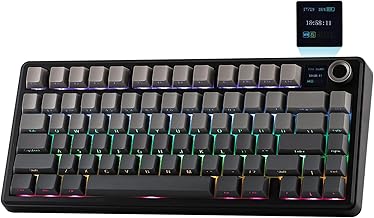
In the crowded world of budget mechanical keyboards, finding a model that balances performance, features, and build quality can feel like a quest. Enter the Aula F75, a 75% wireless keyboard that promises premium features like a gasket mount and five-layer padding at an accessible price point. This isn't just another generic peripheral; it's a statement piece aimed at enthusiasts and gamers who crave customization without breaking the bank. But does it live up to the hype? In this comprehensive review, we'll dissect every aspect of the Aula F75, from its typing feel and sound signature to its wireless reliability and overall value proposition.
Unboxing and First Impressions: A Premium Presentation
Right out of the box, the Aula F75 makes a strong impression. Our review unit in the Light Blue colorway with LEOBOG Reaper switches arrived securely packaged with all necessary accessories: a USB-C to USB-A cable, a 2.4GHz wireless dongle, a keycap puller, a switch puller, and a user manual. The keyboard itself feels substantial, thanks to its robust construction and the weight of its internal padding. The aesthetic is clean and modern, with a two-tone keycap set that complements the case color. The inclusion of a rotary knob on the top right is a welcome addition for quick volume or RGB adjustments, a feature often reserved for higher-priced boards. This initial unboxing experience sets a high bar for what a budget-friendly mechanical keyboard can offer.
Build Quality & Design: More Than Meets the Eye
The cornerstone of the Aula F75's appeal is its gasket mount design. Unlike traditional tray-mounted or top-mounted keyboards, a gasket mount suspends the plate and PCB within the case using silicone or rubber gaskets. This design aims to absorb typing shocks, reduce metal ping, and create a softer, more consistent typing feel across the entire board. The Aula F75 takes this a step further with its advertised five-layer padding, which includes various foam and silicone sheets between the PCB and the case. In practice, this results in a remarkably muted and poppy sound profile straight out of the box—a rarity in this price segment. The 75% layout is a perfect sweet spot for many users, offering arrow keys and a column of navigation keys while saving considerable desk space compared to a full-sized or even TKL (Tenkeyless) board.
Typing Experience: The Heart of the Matter
Switch Performance: LEOBOG Reaper Switches
The typing experience is largely defined by the switches. Our unit came with LEOBOG Reaper switches, which are linear switches. They offer a smooth keystroke with a relatively light actuation force. The factory lubrication is decent, providing a consistent feel without significant scratchiness. The sound is a deep, muted thock, amplified beautifully by the internal foams. For those who prefer a different feel, the hot-swappable PCB is the star of the show. It uses 5-pin sockets, allowing you to swap in virtually any MX-style switch without soldering. This future-proofs your investment and opens a world of customization, letting you tailor the Aula F75 to your exact preference, be it tactile, clicky, or a different linear switch.
Keycaps and Stabilizers
The stock double-shot PBT keycaps are of good quality. They resist shine and have a slightly textured surface that provides a confident grip. The legends are clear and should withstand heavy use. The stabilizers for the larger keys (spacebar, enter, shift, etc.) are pre-lubricated and perform admirably. There's minimal rattle, and they feel stable when pressed, contributing to the overall premium typing sensation. This attention to detail on stabilizers is often overlooked in budget boards but is executed well here.
Connectivity & Performance: Truly Wireless Freedom
As a wireless keyboard, the Aula F75 offers triple-mode connectivity: Bluetooth 5.0, 2.4GHz via the included dongle, and wired USB-C. For general typing and productivity, Bluetooth works flawlessly, allowing connection to up to three devices and easy switching. For gaming, the 2.4GHz mode is essential. In our tests, the connection was stable with no noticeable input lag during fast-paced gaming sessions. The 3000mAh battery provides excellent battery life, lasting weeks with RGB lighting off and several days with it on at moderate brightness. The inclusion of a USB-C port for both charging and wired use is now standard, but it's executed reliably here.
Software, RGB, and Customization
The Aula F75 features per-key RGB backlighting with a variety of effects that can be cycled through using onboard controls. The lighting is bright and even, shining clearly through the shinethrough legends on the keycaps. While it lacks dedicated, extensive desktop software, the onboard controls are surprisingly comprehensive for managing lighting, macros, and key remapping. For a user who values plug-and-play simplicity, this is a benefit. Advanced users who want deep graphical software for layer programming might find it limiting, but for most, the hardware-based customization is more than sufficient.
Who Is the Aula F75 For?
This keyboard is a fantastic choice for several types of users. First, it's an incredible entry point for newcomers to the 75-percent keyboard layout or the mechanical keyboard hobby who want a feature-rich board without a steep learning curve or cost. Second, it's perfect for the budget-conscious enthusiast who understands the value of a gasket mount and hot-swap capability but can't justify a $200+ purchase. Finally, it serves as an excellent secondary or travel board for seasoned enthusiasts due to its wireless capabilities and solid build.
Final Verdict: A New Benchmark for Budget Keyboards
The Aula F75 is more than just a good budget keyboard; it's a game-changer. It successfully brings high-end features like a properly implemented gasket mount, extensive internal padding, and a versatile hot-swap PCB to a remarkably affordable price point. While it may not have the flawless finish of a custom $500 build, it delivers 90% of the typing experience for a fraction of the cost. Its wireless performance is solid, the stock configuration is excellent, and the customization ceiling is high. If you're in the market for a compact, feature-packed gaming keyboard that doubles as a delightful typing instrument, the Aula F75 should be at the very top of your list. It sets a new standard for what we can expect from the budget segment, making premium tactile and acoustic experiences accessible to all.