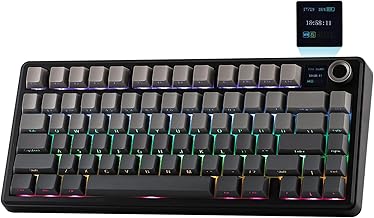
In the crowded world of mechanical keyboards, finding a model that balances premium features with innovative technology at a competitive price point is a rare feat. Enter the Aula F75 MAX, a wireless mechanical keyboard that isn't just another peripheral but a statement piece for your desk. This comprehensive review dives deep into every aspect of the F75 MAX, from its eye-catching TFT screen and satisfying gasket-mounted typing feel to its versatile wireless connectivity. Whether you're a competitive gamer, a productivity powerhouse, or a keyboard enthusiast, this 75% layout contender demands your attention.
The Aula F75 series has been making waves, and the MAX variant is its crowning achievement. It encapsulates the current trends in the enthusiast keyboard scene: a compact form factor, a typing experience focused on sound and feel, and smart, customizable features. This isn't merely a tool for input; it's an interactive gadget. We'll explore if it lives up to the hype, how its gasket mount design translates to daily use, and whether that unique screen is a gimmick or a game-changer.
Unboxing and First Impressions: A Premium Presentation
Right from the unboxing, the Aula F75 MAX sets a high bar. The packaging is sturdy and well-designed, hinting at the quality within. Inside, you'll find the keyboard itself, a high-quality braided USB-C cable for charging and wired use, a keycap puller, a switch puller (essential for its hot-swappable nature), and a user manual. The Black Gradient colorway of our review unit is stunning, with a subtle shift in tone that adds depth without being flashy. The keyboard has a substantial, premium weight to it, immediately conveying a sense of durability and solid construction that cheaper plastic boards lack.
Design & Build: The 75% Layout and Gasket Mount Magic
The 75% Form Factor: Perfect Balance
The 75% layout is arguably the sweet spot for many users. It retains the crucial function row and navigation cluster (like arrow keys and page controls) that are omitted on 65% keyboards, while still saving significant desk space compared to a full-sized or even tenkeyless (TKL) board. The Aula F75 MAX executes this layout flawlessly. The key spacing is standard, so transitioning from a larger keyboard is intuitive. The case has a slight incline for ergonomics, and the bezels are slim, giving it a modern, sleek look.
Gasket-Mount Construction: A Typing Revolution
This is where the gasket gaming keyboard design truly shines. Unlike traditional tray-mounted or top-mounted keyboards where the plate is screwed directly into the hard case, a gasket mount uses rubber or silicone gaskets to suspend the plate and PCB inside the case. This creates a typing experience that is noticeably softer, more cushioned, and less harsh. Each keystroke on the F75 MAX has a pleasant, muted depth to it. The board exhibits little to no case ping or metallic echo—a common issue with cheaper mechanical keyboards. The result is a uniquely satisfying and quiet(er) sound signature that feels premium and intentional.
Star Features: The TFT Screen and Wireless Prowess
The Interactive TFT Screen: More Than a Gimmick
The standout feature of the Aula F75 MAX is undoubtedly its integrated TFT screen. Positioned above the arrow keys, this color display is functional and customizable. It can show system stats like CPU/GPU usage and temperature (with companion software), display custom animations or GIFs, show the current time and date, or indicate connection mode and battery level. While not essential, it adds a layer of personalization and utility that sets this keyboard apart. Navigating its menus with the included rotary knob is smooth and intuitive, making it easy to adjust volume, scroll web pages, or control the screen settings on the fly.
Tri-Mode Wireless Connectivity: Freedom to Choose
As a true wireless mechanical keyboard, the F75 MAX offers exceptional flexibility. It supports 2.4GHz wireless via a USB-A dongle for a lag-free experience crucial for gaming, Bluetooth 5.0 for connecting to multiple devices (like a PC, Mac, and tablet), and wired USB-C. Switching between modes is quick and reliable. The battery life is impressive, lasting for days even with the RGB backlight on, and weeks with it off. This makes it a fantastic PC/Mac/Linux keyboard, easily hopping between different operating systems in your workflow.
Performance: Typing, Gaming, and Customization
Typing Feel and Sound
The typing experience is sublime, thanks to the gasket mount and the factory-lubed switches (our unit came with linear red switches). Keystrokes are smooth, consistent, and surprisingly quiet for a mechanical keyboard. The stock keycaps are thick PBT with a pleasant texture, resisting shine over time. The stabilizers for larger keys (like spacebar and enter) are well-tuned, with minimal rattle—a sign of good factory assembly. Whether you're writing long documents or coding, the F75 MAX is a joy to use for extended periods.
Gaming Performance
In gaming, the 2.4GHz connection provides a rock-solid, low-latency link. We tested it in fast-paced FPS titles and competitive MOBAs and experienced no input lag or disconnections. The N-key rollover (NKRO) in wired and 2.4GHz modes ensures every keypress is registered accurately, even during complex key combinations. The 75% layout provides all necessary keys without forcing your mouse hand into an awkward position, promoting better ergonomics during long gaming sessions.
The Hot-Swap Advantage
The hot-swappable keyboard feature is a gift for enthusiasts and tinkerers. Without any soldering, you can pop out the stock switches and try hundreds of other compatible 3-pin or 5-pin mechanical switches. Want a tactile bump for typing? Swap in some Brown switches. Prefer a silent office? Install silent linear switches. This future-proofs your investment and allows you to tailor the sound and feel precisely to your liking, making the Aula F75 platform a long-term companion.
Software and RGB Lighting
The companion software (available for Windows) unlocks the full potential of the Aula F75 MAX. Here, you can remap every key, create complex macros for gaming or work, fine-tune the RGB lighting effects for each key individually, and upload media for the TFT screen. The RGB backlighting is vibrant and even, with a wide range of preset patterns and the ability to create your own. While the software isn't the most polished on the market, it is functional and provides the necessary depth for customization.
Who Is the Aula F75 MAX For?
This keyboard is a versatile champion suited for several audiences:
- The Gaming Enthusiast who wants wireless freedom, low latency, and a unique aesthetic with the TFT screen.
- The Keyboard Hobbyist who values a great gasket-mount typing feel and the freedom to hot-swap switches without breaking the bank.
- The Multi-Device Professional who uses a PC, Mac, or Linux machine and needs a single, high-quality keyboard to switch between them seamlessly.
- The Space-Conscious User who wants the functionality of a TKL keyboard but in a more compact 75% form factor.
Final Verdict: Is the Aula F75 MAX Worth It?
The Aula F75 MAX is not just another mechanical keyboard; it's a compelling package that punches well above its weight class. It successfully combines enthusiast-grade features like a gasket mount and hot-swap sockets with innovative tech like a customizable TFT screen and robust tri-mode wireless. For its price point, it offers an exceptional value proposition that is hard to beat.
Pros: Excellent gasket-mount typing feel, versatile tri-mode connectivity, useful and fun TFT screen, great battery life, high-quality stock keycaps, and extensive customization via software and hardware.
Cons: Companion software could be more user-friendly, the keyboard is on the heavier side (which is also a pro for stability), and the TFT screen, while cool, is a power draw.
If you're in the market for a feature-packed, well-built wireless mechanical keyboard that excels in both gaming and typing, the Aula F75 MAX should be at the very top of your list. It delivers a premium, customizable experience that will satisfy both newcomers to the mechanical keyboard world and seasoned enthusiasts looking for their next daily driver.


