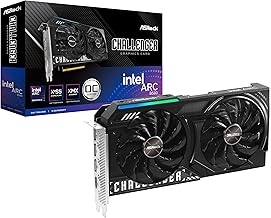
When you invest in a powerful graphics card like the B580, you're not just buying raw performance; you're investing in the potential for smooth, high-fidelity gaming and content creation. However, that potential is directly tied to one critical, often overlooked factor: thermal management. The efficiency with which your GPU dissipates heat determines its stability, longevity, and ability to maintain peak clock speeds. At the heart of this thermal system lies a humble yet vital component: thermal paste, also known as thermal interface material (TIM). This guide will walk you through everything you need to know about applying thermal paste to your B580 GPU, with a focus on achieving the best possible results using a premium compound like ARCTIC MX-4.
Why Thermal Paste is Crucial for Your B580 GPU
Modern GPUs, including the B580, generate immense amounts of heat under load. The GPU die (the main processing chip) is in direct contact with a metal heatsink, but even two perfectly flat metal surfaces have microscopic imperfections. These tiny air gaps are terrible conductors of heat. Thermal paste fills these voids, creating a continuous, thermally conductive bridge between the die and the heatsink. Without it, or with a poorly applied or degraded paste, heat transfer is impeded, leading to higher operating temperatures. For a B580, this can mean thermal throttling (where the card slows itself down to avoid damage), reduced frame rates, system instability, and in the long term, accelerated component wear. Using a high-quality thermal paste is a simple, cost-effective upgrade that safeguards your investment.
Choosing the Right Thermal Paste: What to Look For
Not all thermal pastes are created equal. For a high-performance component like a GPU, you need a paste that balances several key properties. First is thermal conductivity, measured in Watts per meter-Kelvin (W/m·K). This number indicates how efficiently the paste moves heat. Higher is generally better. Second is longevity or durability. Some pastes dry out, pump out (get displaced by thermal cycling), or degrade quickly, requiring frequent reapplication. Third is ease of application; a paste with a good consistency is easier to spread evenly. Finally, for safety, a non-conductive and non-capacitive formula is highly recommended for beginners and experts alike, as it prevents short circuits if a small amount spills onto surrounding components. This is where a compound like ARCTIC MX-4 excels, offering a superb blend of very high thermal conductivity, exceptional long-term stability, and a safe, non-conductive composition perfect for DIY PC cooling projects.
Step-by-Step: How to Apply Thermal Paste to Your B580 GPU
Preparation and Safety First
Before you begin, gather your tools: isopropyl alcohol (90% or higher), lint-free coffee filters or microfiber cloths, a plastic spudger or credit card (optional), and your new thermal paste. Power down your PC, unplug it, and hold the power button for a few seconds to discharge residual electricity. Work on a clean, static-free surface. Consider using an anti-static wrist strap. Carefully remove the B580 graphics card from your system.
Disassembling the GPU Cooler
Most GPU coolers are held on by a series of small screws on the backplate. Document or photograph the screw locations as you remove them. Gently unplug any fan or RGB headers connected to the main PCB. Once all screws are removed, the cooler should separate from the PCB. It may require a slight twisting motion if the old thermal paste is acting like glue. Be patient and gentle to avoid damaging any components.
Cleaning the Old Thermal Paste
This is a critical step. Apply a small amount of isopropyl alcohol to your cloth and gently wipe away the old thermal compound from both the GPU die and the cooler's cold plate. Avoid using paper towels, as they can leave lint. Take your time until both surfaces are completely clean and shiny. Ensure no residue is left, as it will hinder the performance of the new paste.
Applying the New Paste: The Best Methods
For a GPU die, which is typically a smaller, centered square or rectangle (unlike a larger CPU), the application method is key. We recommend the "pea-sized dot" or "small 'X'" method for a B580.
- Pea-Sized Dot: Place a single, small pea-sized dot (about 3-4mm in diameter) of ARCTIC MX-4 directly in the center of the GPU die. When you reattach the cooler, the pressure will spread the paste evenly across the surface.
- Small 'X' Method: Draw a very thin line of paste from corner to corner of the die, forming an 'X'. This can help ensure coverage to the edges for larger dies.
Avoid spreading the paste manually with a tool, as this can trap air bubbles. The goal is to use just enough paste to cover the die without excessive overflow. The non-conductive nature of MX-4 provides a safety net against minor over-application.
Reassembly and Testing
Carefully realign the cooler with the PCB and screw it back together in a criss-cross, star-pattern sequence. Tighten the screws gradually and evenly to ensure consistent pressure. Reconnect any fan cables. Reinstall the card into your PC. Before closing the case, power on the system and monitor your GPU temperatures using software like HWMonitor or GPU-Z. Run a stress test (like FurMark) or a demanding game for 15-20 minutes. Compare the load temperatures to your previous readings. A successful application with a high-quality thermal compound like MX-4 should result in a noticeable drop of 5-15°C under load.
Common Mistakes to Avoid with B580 Thermal Paste Application
Even experienced builders can make errors. Here are the top pitfalls to sidestep:
- Using Too Much Paste: More is not better. Excess paste acts as an insulator and can squeeze out onto the PCB, creating a mess. The thin layer needed for optimal heat transfer is surprisingly small.
- Using Too Little Paste: Incomplete coverage leaves air gaps, creating hotspots on the GPU die.
- Not Cleaning Thoroughly: Mixing old and new pastes can reduce effectiveness and trap debris.
- Overtightening Screws: This can damage the PCB or warp the cooler, creating an uneven mounting pressure that hurts thermal transfer.
- Using Low-Quality Paste: Generic or old paste lacks the thermal conductivity and durability needed for a modern GPU. Investing in a proven performer like MX-4 is worth it.
Maintaining Your B580's Cooling Performance
Reapplying thermal paste isn't a yearly chore. A premium paste like ARCTIC MX-4 is formulated for long-term durability, often lasting 8 years or more without degradation. However, you should monitor your B580's temperatures periodically. If you notice a gradual, consistent increase in idle and load temperatures (e.g., 10°C higher than when first applied) over a period of months, it might be time for a refresh. Regularly cleaning dust from your GPU's heatsink and case fans is equally important for maintaining overall system cooling efficiency.
Conclusion: Unlock Your B580's Full Potential
Proper thermal management is the cornerstone of a high-performance, stable, and long-lasting gaming PC. Taking the time to correctly apply a high-quality thermal paste to your B580 GPU is one of the most impactful DIY maintenance tasks you can perform. By following this guide and using a reliable product like ARCTIC MX-4, you ensure that your graphics card runs cooler, quieter, and faster, delivering the seamless experience you paid for. Whether you're building a new system or rejuvenating an existing one, mastering this skill is a key part of savvy PC building and upkeep.